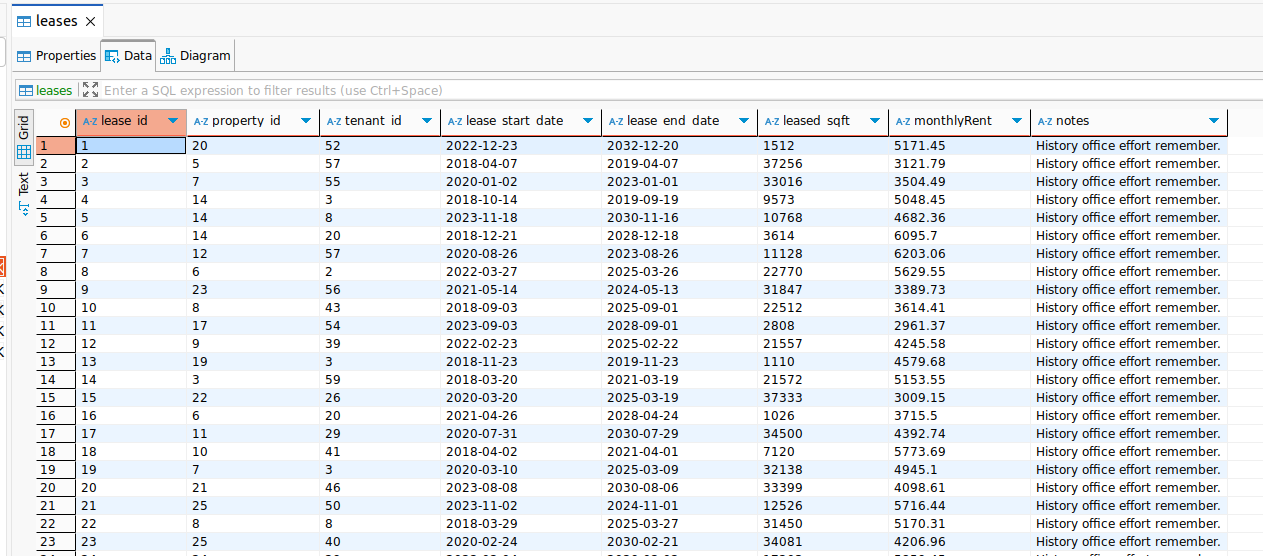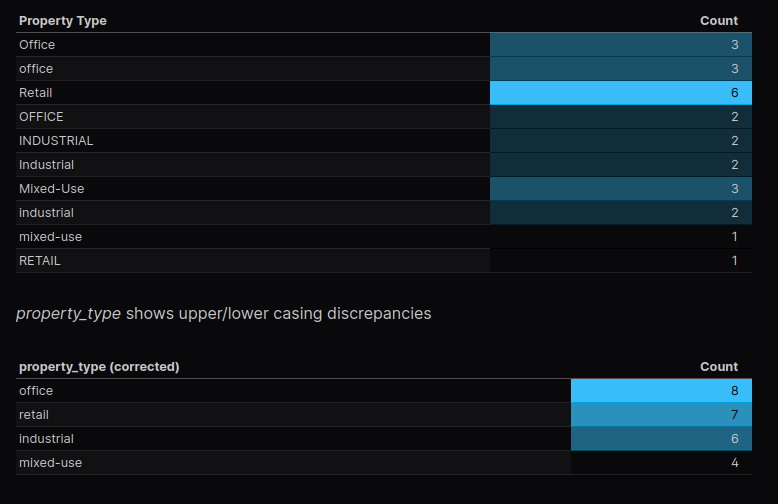
Most small and medium-sized businesses are sitting on more data than they realize – exports from operational systems, spreadsheets passed between teams, flat files pulled “just in case”. The problem isn’t a lack of data or even a lack of technical skill. It’s not knowing where to start, or how to turn a messy dataset into something usable without over-engineering the solution.
In this post, I’ll walk through an example of what a real-world data profiling exercise would look like using a dataset that closely mirrors what you’d encounter in practice. I’ll show what I check for, why those checks matter, and how I approach a brand new dataset to help a business make use of neglected data. Along the way, I’ll demonstrate how to perform analysis and produce a clear, shareable report at the same time – using only basic SQL.
You can view our final result here: Real Estate Data Profiling Report Sample – BaroodyDataSolutions
Follow-along with a downloadable data profiling checklist you can use as a reference – whether you’re exploring a dataset for the first time or formalizing your own approach. Also join our newsletter to receive valuable information – just like this article!
Receive a Free Data Profiling Checklist
Get valuable bi-monthly tips & insights sent right to your inbox by joining our newsletter!
We share…
- Data strategies & best-practices
- Database guides & recommendations
- Data reporting tool tips & tricks
The Problem
There are a few problems we often need to contend with when attempting to use a new data set.
- Raw datasets are often messy and full of discrepancies
- The data is hard to understand or incomplete
What we need is a framework for systematically assessing the quality of the data. We need to go through a discovery process to understand the potential pitfalls of the data. And, ideally, we’d like to assemble these findings into an easily digestible report that can be referenced in the future. Shareable, understandable and repeatable. And the less coding skills required, the better.
The Approach
Before building dashboards or reports, it’s important to understand how much the underlying data can support meaningful analysis. Exploratory data analysis and profiling helps us identify gaps, inconsistencies and missing data early on before they turn into misleading metrics and other issues down the road.
Following the Free Data Profiling Checklist (download above), the steps we will take to perform this analysis are:
- Load the raw data for each table (or file) into Evidence.dev
- Create a wire-frame (based on the requirements in the checklist) specifically tailored to each of the data tables
- Use the wire-frame to create reports with a detailed data profile for each table
The thing that makes Evidence.dev so awesome is that as we perform the analysis, we are simultaneously creating a report with computed metrics, data tables and interactive charts that paint a full picture of the quality of our data.
The Data
This example project consists of imitation flat-file extracts from a fictitious real estate management system. The dataset was intentionally chosen to reflect the kinds of conditions commonly encountered in real operational data – useful, but imperfect.
Our tables:
- leases
- properties
- rent_payments
- tenants
- maintenance_requests
- vacancy_history
We follow the documentation to configure our CSV files as sources in evidence.dev
From this point forward, we will be able to write SQL queries to access our data from these files. This means we can join data from multiple files together, create conditions, and create charts and visualizations – all with SQL right in our evidence.dev notebook.
Techniques
In this section we will work our way through the data profiling checklist, and I’ll give some general pointers on how to accomplish these checks, along with some examples that demonstrate the importance of performing a data profiling exercise on a new dataset. I’ll also call-out some of the great features of evidence.dev as we work our way through the data.
1. Row-Level Checks
These checks offer a high-level overview of the data. It gives us a quick view into how many records we’re working with, gives us an idea of categorization or special groups that might be present, and how many missing or blank values there may be in the table.
Record the total number of rows
Easily accomplished in SQL by querying the count of records in the table
select count(*) as total_lease_records from leasesSegment records into key status groups
Depending on the nature of the data, certain groupings may present themselves. In our case, leases have a start_date and an end_date. Therefore, one of the segmentations we can look at are active vs. inactive leases. There are a number of ways to accomplish this in SQL, here’s one way:
select
      sum(case when current_date between lease_start_date and lease_end_date then 1 else 0 end) active_count,
      sum(case when current_date not between lease_start_date and lease_end_date then 1 else 0 end) inactive_count,
      count(*) total
from leases
Calculate % of NULL and/or Blank fields
select
      'lease_id' as column_name,
      count(*) as total_rows,
      sum(case when lease_id is null then 1 else 0 end) as null_or_blank_count
from rent_payments
union all
select
      'payment_month' as column_name,
      count(*) as total_rows,
      sum(case when payment_month is null or payment_month = '' then 1 else 0 end) as null_or_blank_count
from rent_payments
...
...
...
And with evidence, we can display this cleanly in a data table with the following markdown..
<DataTable data={rp_null_blank} rowNumbers=true rowShading=true>
    <Column id=column_name />
    <Column id=total_rows />
    <Column id=null_or_blank_count contentType=colorscale colorScale=info align=center />
    <Column id=null_or_blank_pct contentType=colorscale colorScale=info align=center />
</DataTable>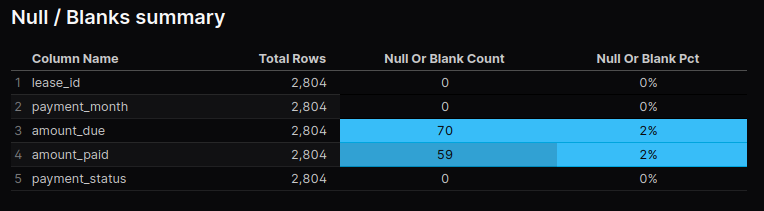
Pretty simple and a great result for a report.
2. Primary Key Uniqueness
Typically, a table will have a column (or a combination of multiple columns) that uniquely defines each record. For instance, in our leases table, each record has a unique value in the column lease_id.
Check for Uniqueness (No duplicate primary keys)
The way we make this simple check is to compare the distinct count the column to the overall row count of the table:
select
      count(distinct lease_id) unique_lease_ids,
      count(*) total_records
from leases
Our rent_payments table is a little more complicated. There isn’t a single column that has unique values for every record. Instead, we have take the values from the lease_id, payment_month, and payment_status columns together. This is called a composite primary key. And it will be very important down-the-road when we go to build our reports, hence why we perform these checks ahead of time.
``` sql rp
select concat(cast(lease_id as int), '-', payment_month, '-', lower(payment_status)) lease_month_status, rp.*
from rent_payments
```

``` sql rp_composite_pk_duplicates
select lease_month_status, count(*)
from ${rp}
group by lease_month_status having count(*) > 1
order by 2 desc
```
Since we’re utilizing a composite primary key, it can be useful to utilize a CTE (Common Table Expression) within our SQL. This way we can write our composite key logic once and reference it over-and-over again in the future. Instead of using traditional CTE’s, in evidence.de we can reference existing queries in our notebook by calling ${sql_query_name} anywhere in our SQL code.
3. Foreign Key & Relationship Integrity
The from one table that ties it to another table is known as a foreign key. For example, in our dataset each record in the leases table has a column property_id (the primary key of the properties table) which let’s us link the leases and the properties table together. This way we can get details about the property involved in each lease without having to store all the property information directly with the lease information.
You probably have experienced an unwieldy excel spreadsheet where it seems like there’s endless columns making it very hard to keep track of. This scheme allows us to avoid that by separating logical entities. However, it does mean that we have to make sure there’s a valid property_id reference for each lease – we want to check if there are lease records for properties that don’t exist in our data set.
Find % of records with valid references
Use a SQL pattern to check if the foreign key values exist in the referenced table
``` sql leases_property_id_cross_check
select
      distinct property_id,
      case
            when property_id in (select property_id from properties)
            then '<span style="color: green;">True</span>'
            else '<span style="color: red;">False</span>'
      end property_id_cross_check
from leases
```

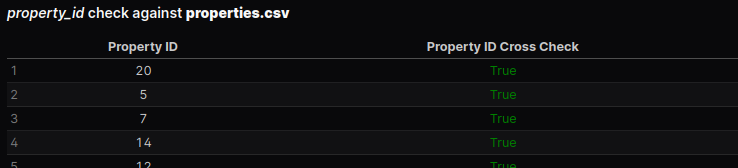
<DataTable data={leases_property_id_cross_check} rowNumbers=true rowShading=true>
    <Column id=property_id align=center/>
    <Column id=property_id_cross_check contentType=html align=center />
</DataTable>
Here’s a great feature of evidence.dev – we can return HTML from our SQL query and inject that into our data tables. In this case we style our True/False flag so that it shows up as conditionally formatted text in our data table.
4. Date Field Validation
Start with a simple min/max calculation on your date column, including any group-by statements that might be applicable.
Sometimes it may or may not make sense for records to have a future date. You can make a quick check for future dated records, for example
select count(*) total
from properties.properties
where year_built > year(current_date)
5. Numeric Field Validation
Review Max/Min/Avg values, unexpected zeroes or nulls
select
    'leased_sqft' column_name,
    min(leased_sqft) min,
    max(leased_sqft) max,
    mean(leased_sqft) avg,
    sum(case when leased_sqft = 0 or leased_sqft is null then 1 else 0 end) null_or_zero_count
from leases
union all
...
Check for extreme outliers
I really like how quick and easy it is to create charts with Evidence. Getting a good sense of the distribution of a numeric field by creating a histogram is very quick and easy:
``` sql monthlyRent_dist
select monthlyRent from leases where monthlyRent is not null
```
<Histogram data={monthlyRent_dist} x=monthlyRent xAxisTitle="monthlyRent" title="Distribution of leases.monthlyRent" />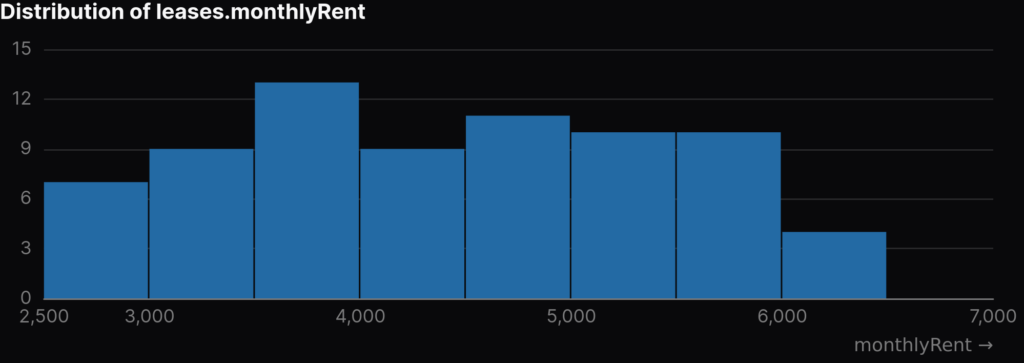
Pulling a chart like this with just a couple lines of code significantly speeds up the exploratory data analysis phase of a project.
6. Text Field Validation
My tenants table has two text columns company_name and industry. I want to quickly see a profile of the quantifiable details of these fields, such as their min & max text length (you never know when someone might stick a long-form textual note in a text field) and if they have any empty strings or null values. I use the same SQL pattern as before for this; max, min, mean, null check and trim(column_name) = '' check.
Since the industry column is categorical, I wanted to see how many tenants are in each industry. Easy and clean in evidence, and immediately ready to include in a deliverable report
```t_industries
select
    industry text_label,
    count(*) total
from tenants.tenants
group by industry
```
<DataTable data={t_industries} rowNumbers=true rowShading=true>
    <Column id=text_label title="Text" />
    <Column id=total title="Occurrences" />
</DataTable>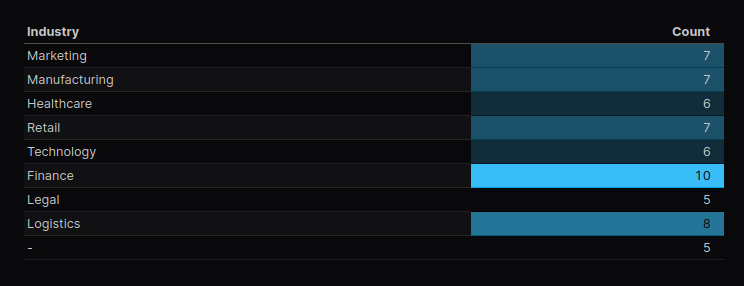
7. Logical Checks
We identified a logical duplicate in our properties table. There are two records with a property name of “Robinson Plaza”. We dig into it further and find that there are two separate properties, located in different states, each with the name “Robinson Plaza”. So in this case it is indeed not a duplicate – but the important thing is we flagged it and investigated further. This is exactly the type of results that we expect from this part of the data profiling process.
Evidence even allows us to add interactivity to our report. Thinking about the logic of vacancy rates, when a new lease starts, our vacancy rate should drop. What we can do is setup a drop-down which will allow us to select one or many properties and view the trend of the vacancy rate while also highlighting the specific dates that a new lease start’s at the given property.
<Dropdown
    data={vh_month_as_date}
    name=prop_multi
    value=property_id
    multiple=true
/>

```sql linechart_vh_pid_month_rate
select vh.*
from ${vh_month_as_date} vh
where vh.property_id in ${inputs.prop_multi.value}
```

```sql annotations
    select
        l.property_id,
        cast(strftime(lease_start_date, '%Y-%m') || '-01' as date) lease_start_month,
        vh.vacancy_rate,
        strftime(lease_start_date, '%Y-%m') lease_label
    from ${linechart_vh_pid_month_rate} vh
        inner join leases l on vh.property_id = l.property_id
                and cast(strftime(l.lease_start_date, '%Y-%m') || '-01' as date) = vh.month_as_date
```

<LineChart
    data={linechart_vh_pid_month_rate}
    x=month_as_date
    y=vacancy_rate

    yAxisTitle="Vacancy Rate by Month"
    series=property_id
    subtitle="Reference points indicate lease_start_date from a valid record in the leases table"
>
    <ReferencePoint data={annotations} x=lease_start_month y=vacancy_rate label=lease_label labelPosition=bottom color=info />
</LineChart>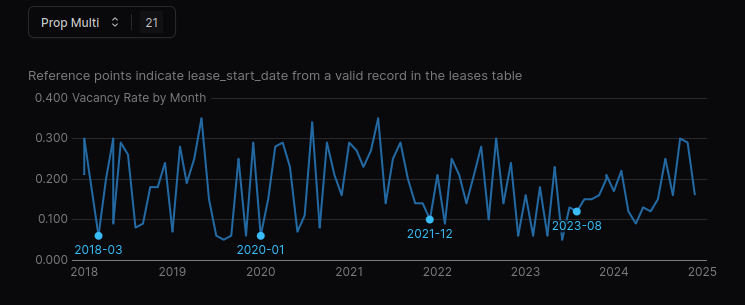
There’s much more variation in the vacancy history than what lines up with our lease_start_date‘s. This might tell us our lease table is incomplete – we’d have to follow up further.
Logical Duplicate Detection Using Business Rules
holder for paragraph explaining what and why
- Checking primary key uniqueness
- Confirming entities are logically unique
- i.e. overlapping active dates for same property_id and tenant_id
- catching scenarios where:
- lease record was re-entered instead of updated
- multiple versions of the same lease exist
- system issues causing overlapping results
holder for a code exampleTakeaway
- duplicates are not always obvious in standard reports
- verifying the logic behind the data leads to accurate reports and can also fix upstream processes
Segment Data Into Key Status Groups
holder paragraph for explaining what and why